
Logistics Agency, Logistics
under 1 hour (a 50% reduction)
Route planning time per dispatcher
from 2–3 hours
Dispatcher copilot across 200+ daily routes
Dispatcher copilot, SMS agent, Email agent
6 weeks
Custom CRM and CMS integrations for service businesses: ServiceTitan, Jobber, HubSpot, and your own site or app, built on Node and Supabase/Postgres.
Call it. An AI answers. That's the demo.
Number coming soon
Plainbuilt builds custom CRM and CMS integrations for service businesses: ServiceTitan custom integrations, Jobber and HubSpot connections, and the link between your website or app and the system that runs the jobs, built on Node and Supabase/Postgres by an engineering practice since 2014 with 200+ shipped projects. Data moves once, in the right direction, on the right trigger.
It makes the systems you already run talk to each other. A job booked on the website lands in ServiceTitan. A customer created in Jobber shows up in HubSpot with the deal. A quote accepted in one place becomes a job in the other. The content on the site comes from the CMS your office already edits. Nothing gets typed twice, and nothing waits for someone to remember.
We build against the real APIs of ServiceTitan, Jobber, HubSpot, and your own site or app, on Node with Supabase and Postgres for anything that has to be stored on the way and Twilio when a step sends a text or places a call. It is the stack our own AI systems run on: a voice agent that books into ServiceTitan is an integration first.
A build runs discovery, spec, build, ship, support. The working session opens discovery; the spec is the build plan; the integration ships into your live systems; and we keep it running after that. Every deployment carries a written ROI commitment, and an integration is no exception.
Media pending
Timeline set in the working session
We start with the systems you already run: which one holds the jobs, which one holds the customers, which one holds the site, and where the same thing gets typed twice. The 30-minute working session opens discovery.
We write down what moves between the systems, in which direction, on what trigger, and the number the written ROI commitment measures. The spec is the build plan.
We build the integration on Node and Supabase, against the real APIs of ServiceTitan, Jobber, HubSpot, or whatever you run.
The integration ships into your live systems and runs on real jobs, real customers, and real traffic.
We keep the integration running after it ships: fixes when a platform changes its API, updates, and the next connection when you want it.
Every deployment carries a written ROI commitment.
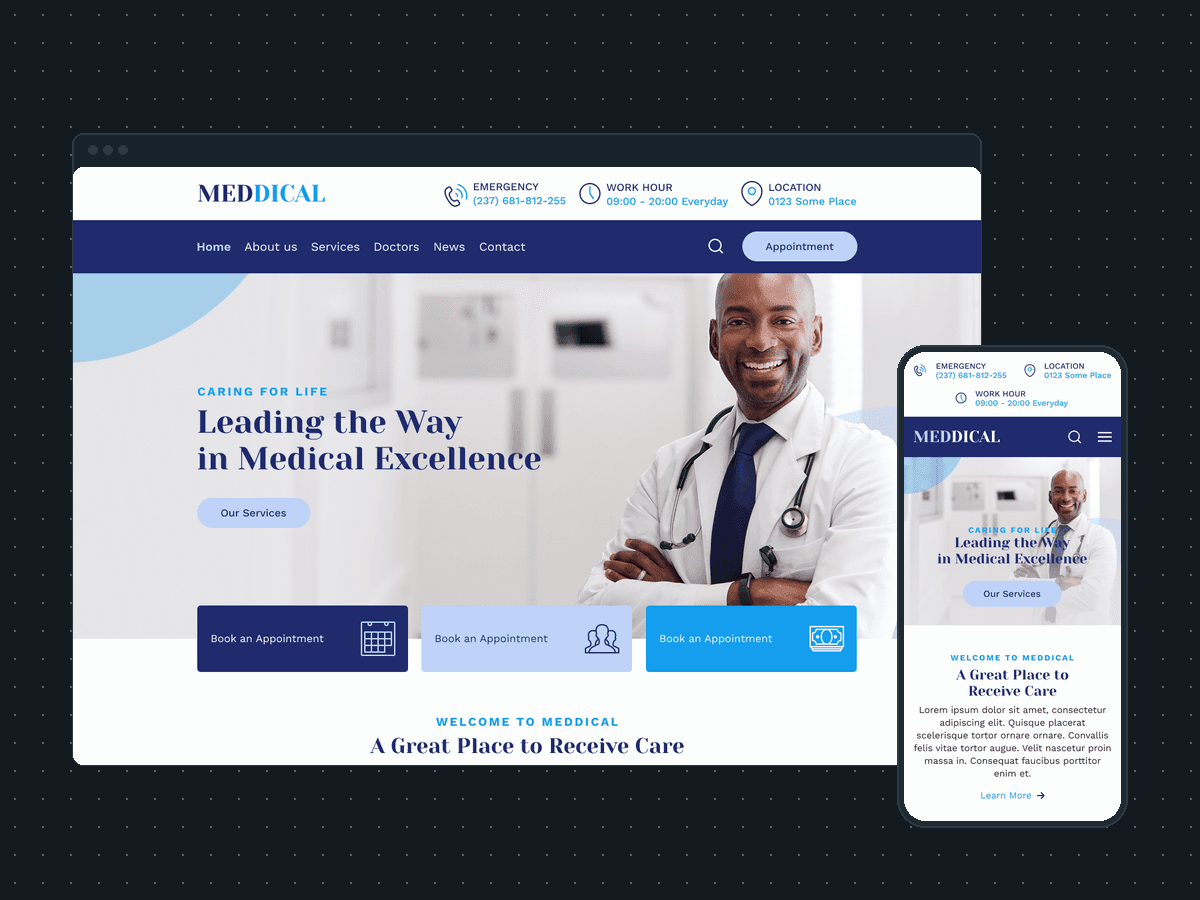
Website development for service businesses, CRM and CMS integration development
Website and CRM design for a doctors' clinic: 9 page designs for desktop and a phone layout, with appointment booking by doctor and department from every page.
Logistics Agency, Logistics
under 1 hour (a 50% reduction)
Route planning time per dispatcher
from 2–3 hours
Dispatcher copilot, SMS agent, Email agent
6 weeks
Pricing on request
Named in the build plan
Node for the services that move the data, Supabase and Postgres where anything has to be stored on the way, and Twilio when a step sends a text or places a call. On the other side sit the systems you already run: ServiceTitan, Jobber, HubSpot, or your own website or app. It is the stack we ship everything in, the same one our own AI systems run on.
A build runs in five steps: discovery, spec, build, ship, support. The 30-minute working session opens discovery: which systems hold what, where the same thing gets typed twice, and what has to move between them. The spec that follows is the build plan: what moves, in which direction, on what trigger, and the number the written ROI commitment measures. Timeline set in the working session
Yes. Every deployment carries a written ROI commitment, and an integration is a deployment. The spec names the number the integration is built to move, and that number is what we measure after it ships. Agreed in the build plan