Skip to content

Unforgettable App: a spaced-retrieval flashcard app

Unforgettable App, a spaced-retrieval flashcard app: 41 iOS screens and a landing page for cards, daily practice and rated recall, built in under 6 months.

Unforgettable App

The engagement

Client
Unforgettable App
Industry
Learning and memory
Year
To follow
Duration
Under 6 months
Delivered
41 screens and a landing page, iOS, onboarding, sign-in, practice with rated recall, flashcards, scheduled tags, profile and settings, built full stack
Stack
To follow
Role
Full-stack development: design and build of the mobile app and the landing page

Unforgettable App is a spaced-retrieval flashcard app for one person: write down what you do not want to forget, practice for a minute a day, rate each recall and the app schedules the next review. Plainbuilt designed and built it full stack and delivered it in under 6 months: 41 iOS screens, from onboarding through practice, flashcards, tags and settings, plus a landing page. The design rests on three rating buttons that name when the card comes back.

Who is Unforgettable App for?

One person and their own memory. The onboarding puts it in the product's words: create a flashcard whenever you identify something you do not want to forget, then practice daily for as little as 1 minute per day, at a consistent time or place, or set reminders in the app. The screens hold no shared decks and no classes. The person writes their own cards, gives each an importance and an urgency, tags them, and practices alone with a timer.

What did Plainbuilt build?

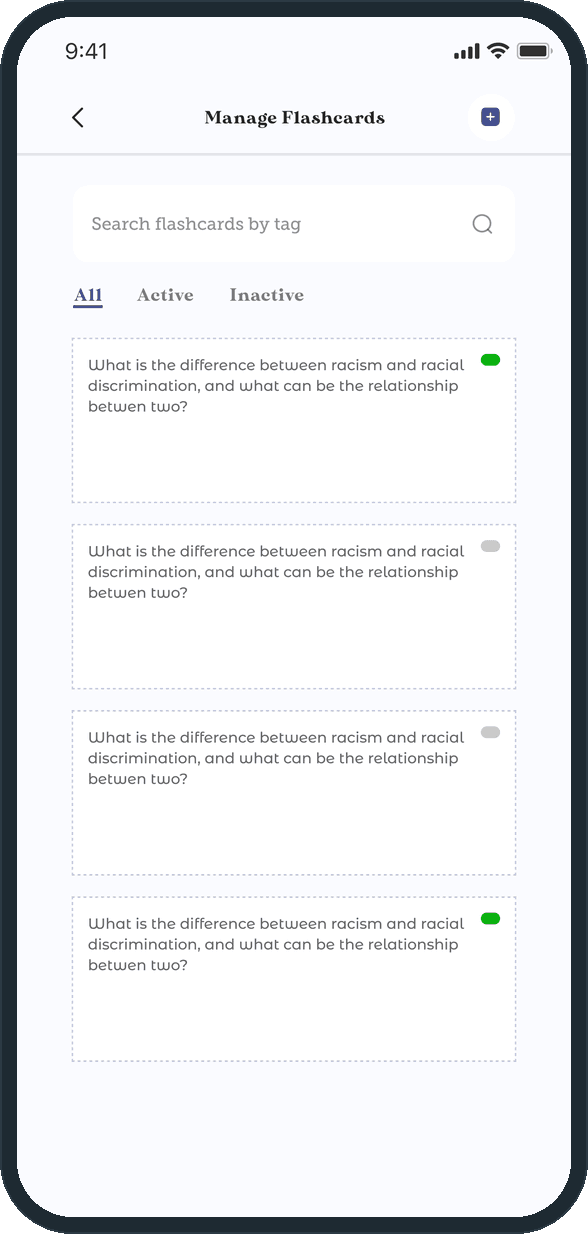
The whole app, front to back, as the screens show it. A splash, four onboarding cards and a welcome screen; sign up, sign in by email or by phone with a 4-digit code, forgot and reset password, and an allow-location prompt. Home with the General Practice card, Add New Flashcard and the Manage tiles. The practice flow: an intro, the question, the answer with its three ratings, the Edit Time sheet behind a long press, an Additional Info popup that shows a card's saved source link, and a Great Work popup when the timer runs out, with Continue or Finish. New and edit flashcard. Manage Flashcards with search by tag and the All, Active and Inactive filters. Manage Tags, create tag and edit tag with the day-and-time schedule. Profile and edit profile. Settings with Change Password, push and email notification toggles, Walkthrough Mode with five guide buttons, a Default Practice Duration timer, Terms of Service, Privacy Policy, Disclaimer, Contact Us, Suspend Account, Delete Account and Logout. A walkthrough mode of 45 coach-mark overlays across home, new flashcard, question, answer, manage flashcards, manage tags and edit tag, ending in a Great popup with View Again and Done. Beside the app, a landing page: the hero, Why Choose Unforgettable, How It Works with five phone panels, a feature grid, a download band and a footer.

What does a practice session look like?

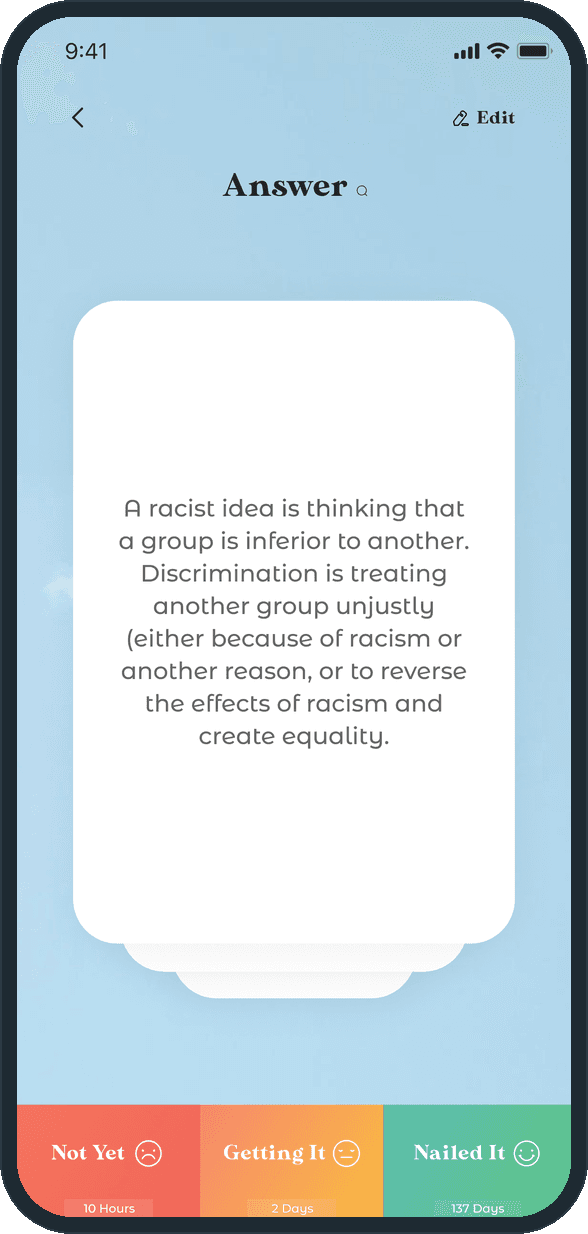
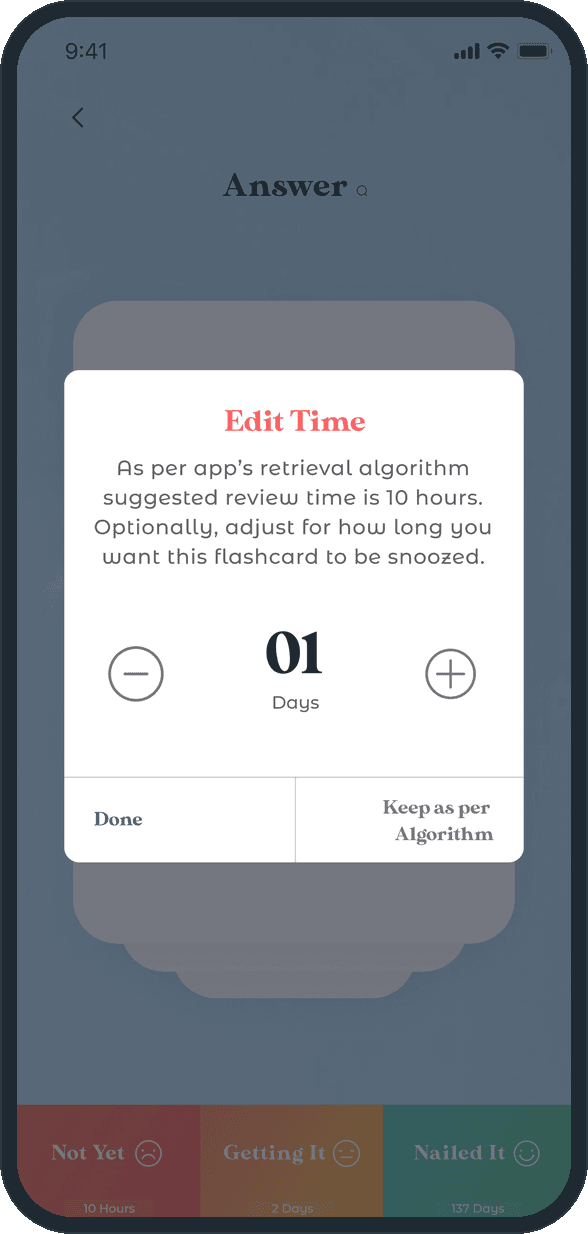
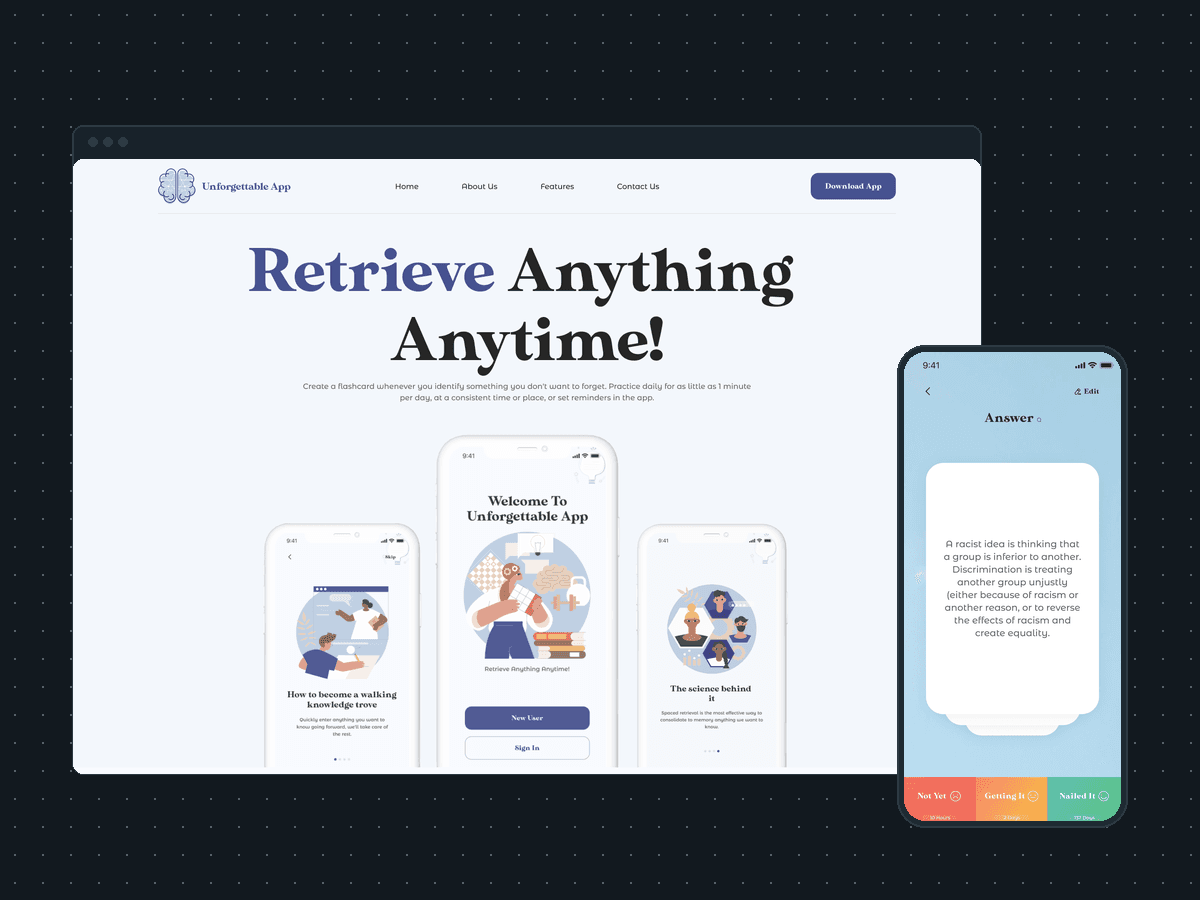
Start General Practice on Home opens the practice intro, then one card at a time on a sky-blue stage: the question, then the answer. Three buttons run across the foot of the answer: Not Yet, 10 hours; Getting It, 2 days; Nailed It, 137 days. A tap rates the recall and sets when the card comes back. A long press opens Edit Time, where the app states its suggested review time, 10 hours, and offers a days stepper to snooze the card or Keep as per Algorithm. The session runs against the default practice duration set on the profile, 03 Min on the screens, and ends with the Great Work popup: your time is up, Continue or Finish.

Why does a tag carry a schedule?

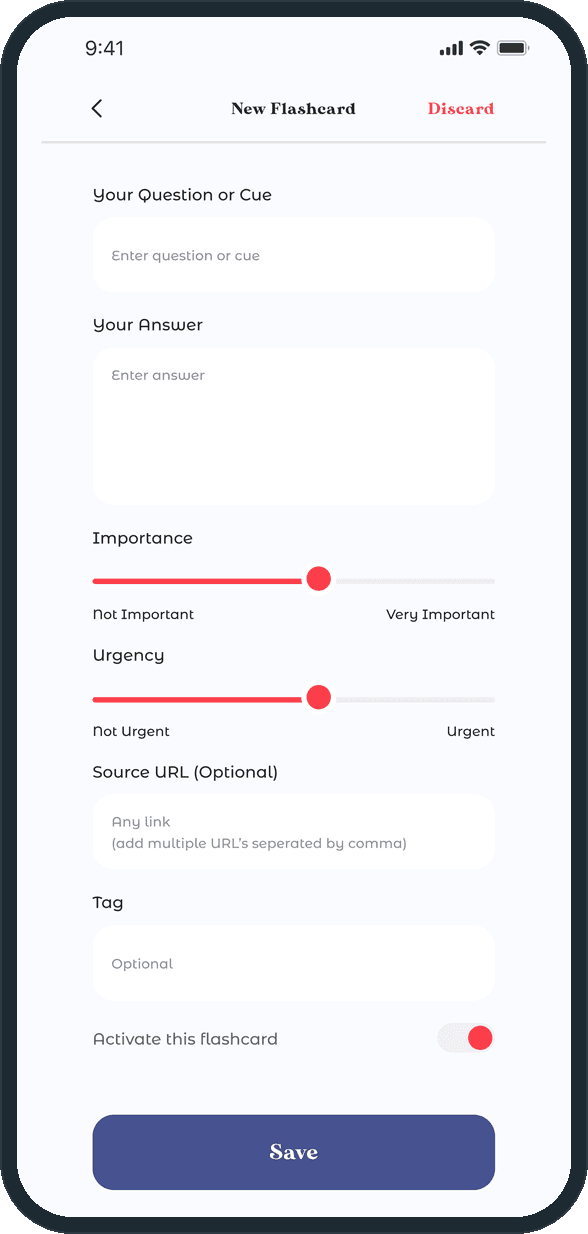
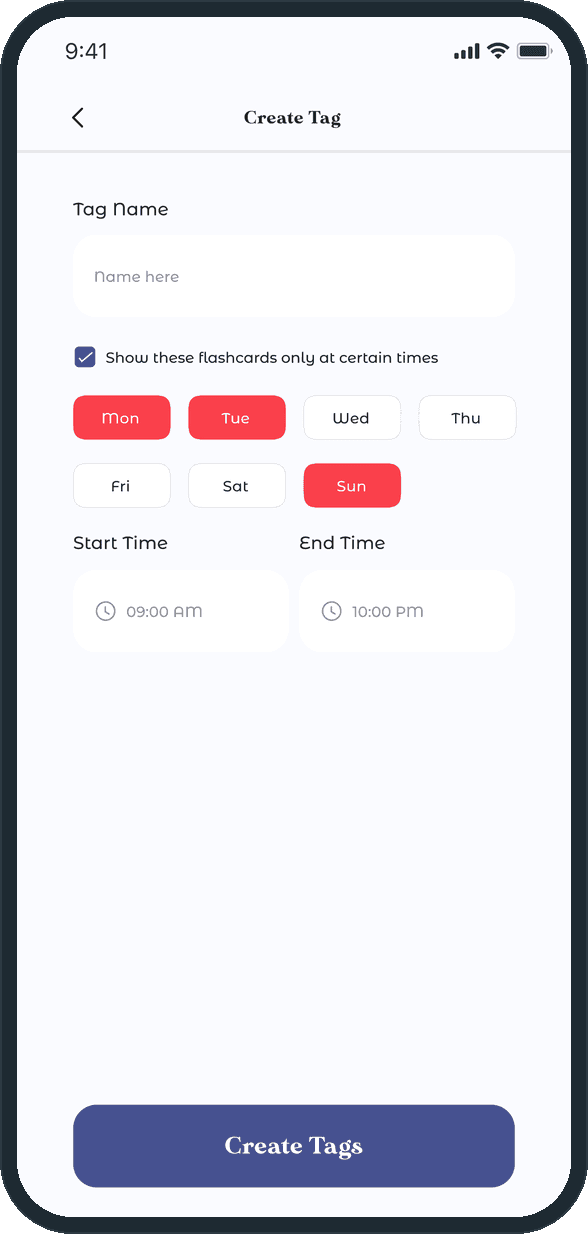
So that a set of cards can stay out of the way except when the person wants it. The Create Tag form has a Show these flashcards only at certain times checkbox, seven day chips and a start and end time, and the Manage Tags list prints each tag's days and hours under its name. The Activate toggle on the card form is the other half of the same idea: a new card can be written now and kept out of the queue until it is switched on, and Manage Flashcards shows the green or gray pill that says which it is.

How does a practice session decide when a card comes back?

After the answer is shown, the person rates the recall with one of three buttons across the foot of the card: Not Yet brings it back in 10 hours, Getting It in 2 days, Nailed It in 137 days. The interval sits under each button, so the choice is visible before the tap. A long press on any button opens Edit Time, where the app states that its retrieval algorithm suggests 10 hours and offers a days stepper to snooze the card, with Done beside Keep as per Algorithm.

  • Unforgettable App: How does a practice session decide when a card comes back?
  • Unforgettable App: How does a practice session decide when a card comes back?

What goes into a flashcard?

A question or cue, an answer, an Importance slider from Not Important to Very Important, an Urgency slider from Not Urgent to Urgent, an optional source URL field that takes several links separated by commas, an optional tag, and an Activate this flashcard toggle that puts the card into the practice queue. Discard sits in the header, Save at the foot.

  • Unforgettable App: What goes into a flashcard?

Can cards be limited to certain days and hours?

Yes, through the tag. The Create Tag form carries a name, a Show these flashcards only at certain times checkbox, seven day chips and a start and end time. The Manage Flashcards list searches by tag and filters All, Active and Inactive, with a green or gray pill on each card to show whether it is in the queue.

  • Unforgettable App: Can cards be limited to certain days and hours?
  • Unforgettable App: Can cards be limited to certain days and hours?

What does the landing page say?

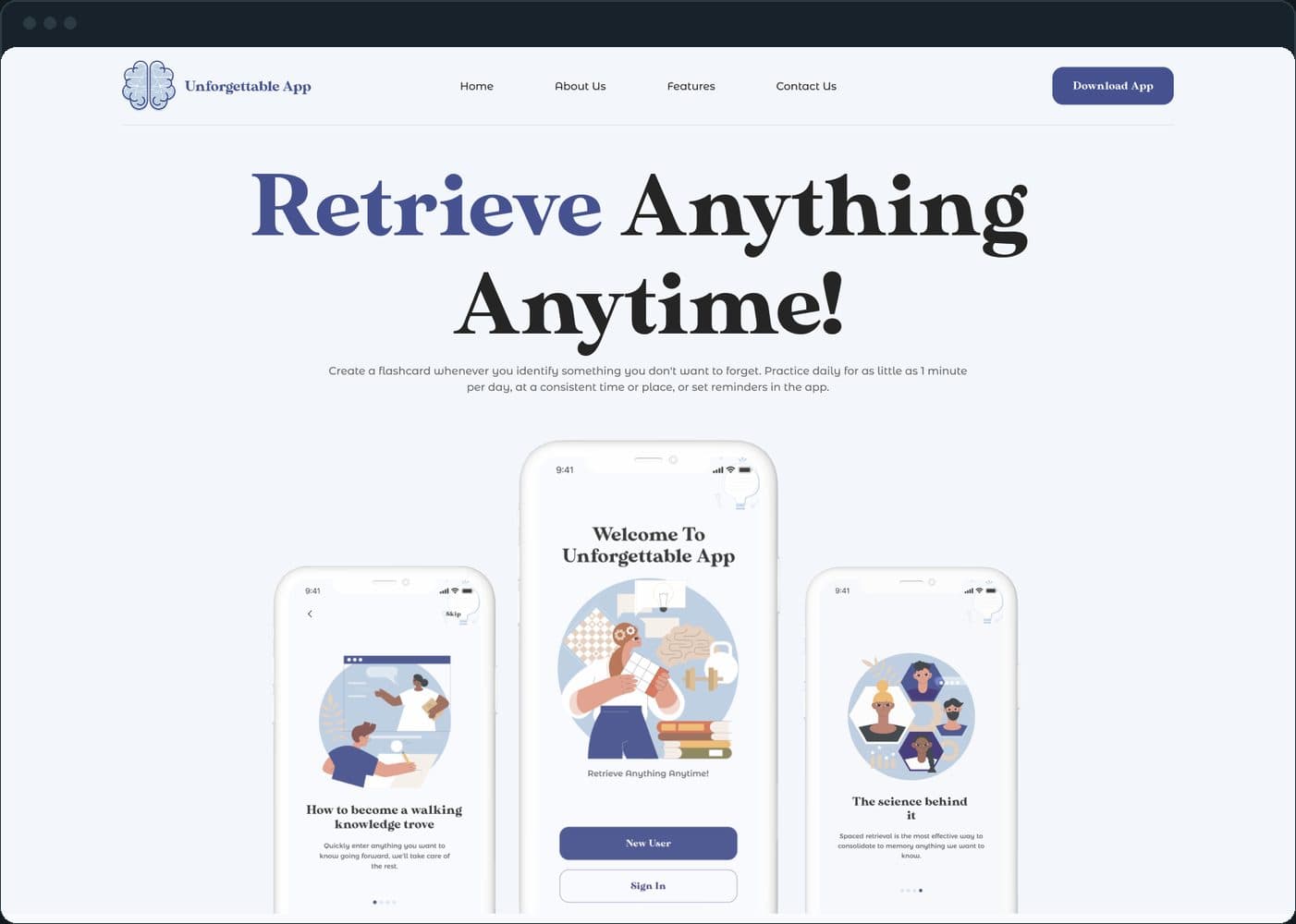
The headline Retrieve Anything Anytime over three phones showing the onboarding and welcome screens, and under it the product's own pitch: create a flashcard whenever you identify something you do not want to forget, practice daily for as little as 1 minute per day, at a consistent time or place, or set reminders in the app. The nav holds Home, About Us, Features, Contact Us and a Download App button.

Unforgettable App: What does the landing page say?

What comes before Home, and what is on it?

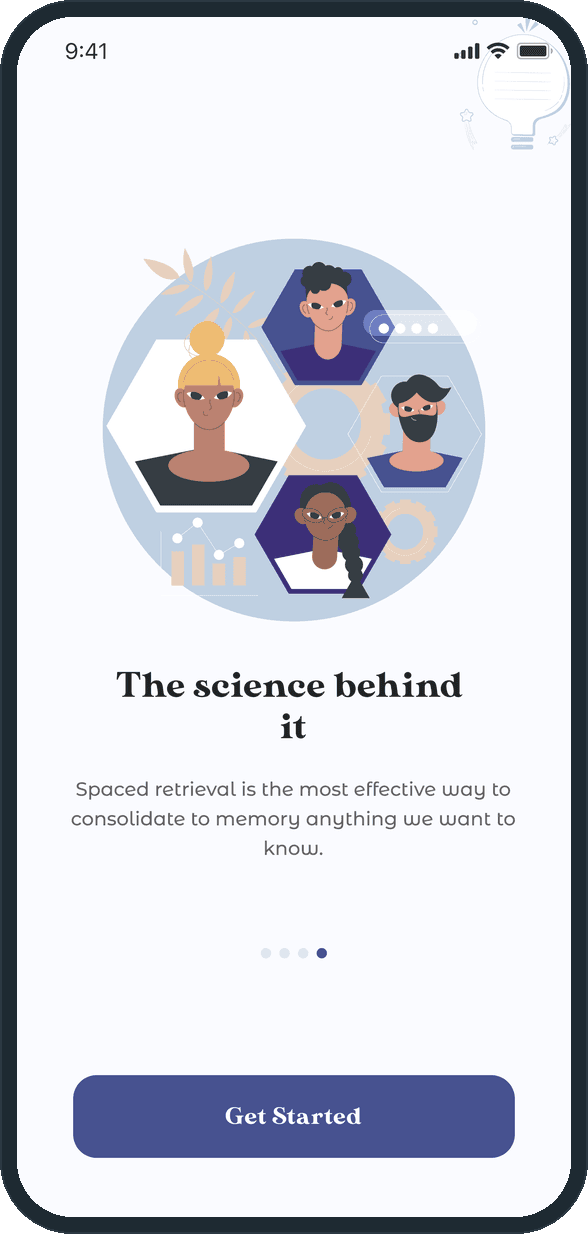
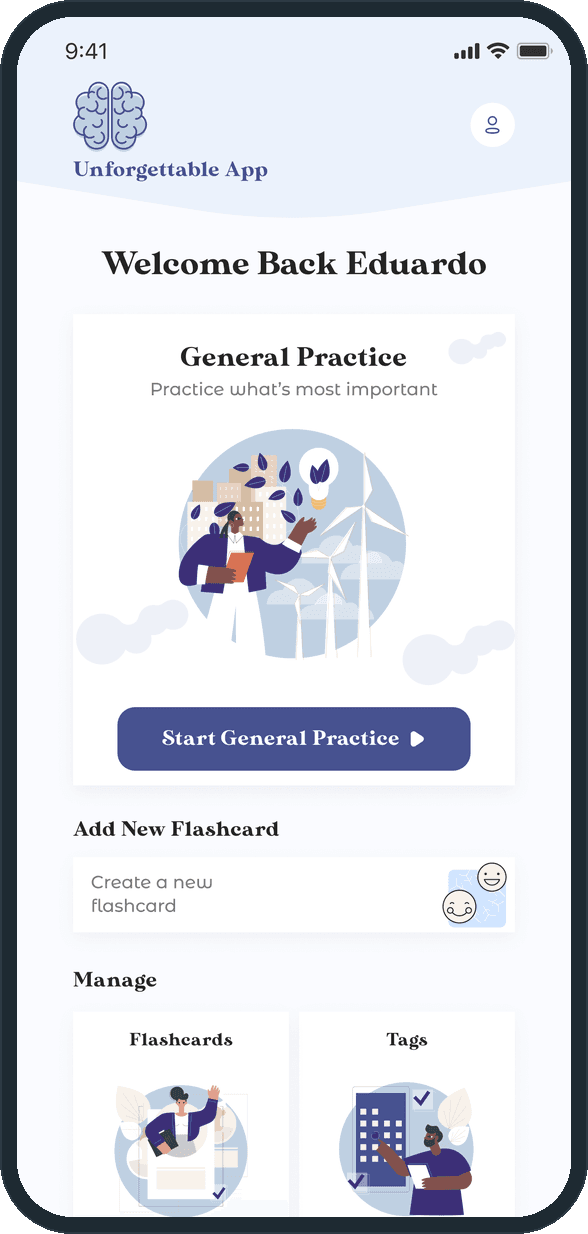
The last onboarding card, The science behind it, states the premise: spaced retrieval is the most effective way to consolidate to memory anything we want to know. Home greets the person by name and leads with one General Practice card and its Start General Practice button, then Add New Flashcard and two Manage tiles for Flashcards and Tags.

  • Unforgettable App: What comes before Home, and what is on it?
  • Unforgettable App: What comes before Home, and what is on it?

The decisions

  • Three buttons, each naming its date.

    The rating is the whole interaction, so it takes the full width of the foot of the answer screen: Not Yet, Getting It and Nailed It in red, amber and green, with 10 Hours, 2 Days and 137 Days printed under them. The person sees what a rating does before choosing it.

  • The algorithm proposes, the person can override.

    A long press on a rating opens Edit Time. The sheet says what the retrieval algorithm suggests, 10 hours, and offers a days stepper to snooze the card instead, with Keep as per Algorithm as the way out. The default is the algorithm; the override is one press away and never hidden.

  • A tag is a schedule, not only a label.

    Creating a tag can restrict its cards to certain days of the week and a start and end time. The same tag is the search key in Manage Flashcards, so one word groups the cards, filters the list and decides when they show up in practice.

  • Practice comes first on Home.

    Home leads with the General Practice card and its Start button, and only then Add New Flashcard and the two Manage tiles. The onboarding asks for a minute a day, and the first thing on the screen is the button that starts it.

What was the outcome?

Built and delivered in under 6 months

One outcome per item, dated, or not disclosed: never an estimate.

Common questions

Did Plainbuilt build Unforgettable App?

Yes. Plainbuilt designed and built it full stack and delivered it in under 6 months.

What can a person do in Unforgettable App?

Write a flashcard with a question or cue, an answer, an importance, an urgency, source links and a tag; practice for a set number of minutes and rate each recall as Not Yet, Getting It or Nailed It; snooze a card for a chosen number of days; group cards under tags that show only on certain days and hours; filter cards by active and inactive; and set push and email notifications, a default practice duration and a walkthrough mode from the profile.