Skip to content

iNROADS: a truck-booking app for shippers and drivers

Mobile app development for iNROADS, a truck-booking app: 16 iOS screens, a shipper side that books and a driver side that takes jobs, built in under 6 months.

iNROADS

The engagement

Client
iNROADS
Industry
Trucking and freight delivery
Year
To follow
Duration
Under 6 months
Delivered
16 screens, iOS, shipper booking and payment, driver job offers, trips and earnings, built full stack
Stack
To follow
Role
Full-stack development: design and build of the mobile app

iNROADS is a truck-booking app with two sides. A shipper sets a pickup and a drop-off on a map, picks a box truck, cargo van or pickup truck and pays by card; a driver goes online, takes or counters the job offer, runs the trip and reads a daily and weekly earnings breakdown. Plainbuilt designed and built it full stack and delivered it in under 6 months: 16 iOS screens, with both sides working from the same map.

Who is iNROADS for?

Two people. The shipper has something to move, from timber and plywood to electronics and home appliances, and needs a truck sized for it, now or later. The driver has a truck and wants the next job with its fee in front of them, a way to counter the price, and a clear record of what the week paid. The splash says it in three words: no empty legs.

What did Plainbuilt build?

The whole app, both sides, full stack. On the shipper side: sign in with email and password or a Facebook, Google or Apple account, a location permission screen, the map home with the vehicle sheet, Shipping Details, Order Details, Make Payment with saved cards and Pay Now & Book, My Bookings with Upcoming and Completed tabs, Cancel Booking with a reason list and a free-text box, the side menu and the profile. On the driver side: the home with the You're Online toggle, the Job Offer with its counter offer field, the current job sheet, the trip map with End Trip, and My Earnings with Today and Weekly views. 16 distinct screens in all, for iOS.

What does the booking look like?

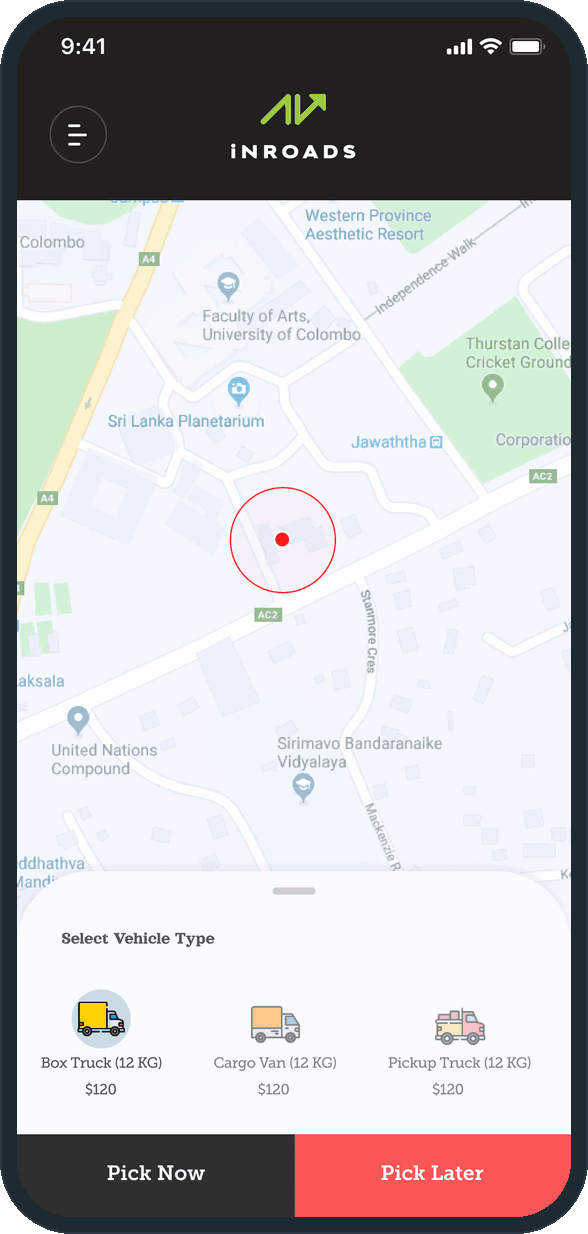
Pin, vehicle, details, review, pay. The map home takes the pickup and the drop-off. The Select Vehicle Type sheet offers a Box Truck, a Cargo Van or a Pickup Truck with a price under each, and a choice of Pick Now or Pick Later. Shipping Details confirms both locations with an Edit link on each, shows the vehicle's ETA, distance and allowable goods, and asks what is being sent. Order Details is the review, one scroll from the locations to the grand total, and Make Payment closes it with a saved card.

Why does the driver get a counter offer?

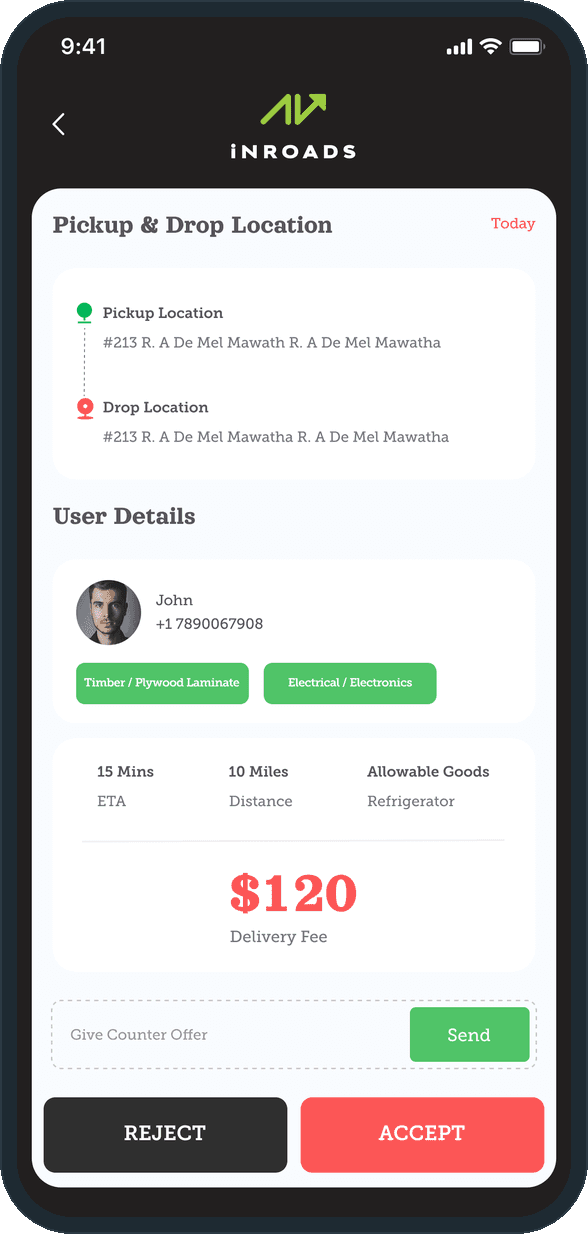
Because the fee is the decision. A job offer shows the delivery fee in the largest type on the screen, and under it a counter offer field with its own Send button, then Reject and Accept. The driver can take the job, turn it down, or name a number and wait, without leaving the offer. On a booking app that pays per trip, the price a driver will run for is the fact that matters most, so the screen gives it the most room and a way to answer it.

How does a shipper book a truck?

The shipper sets a pin on the map and the Select Vehicle Type sheet slides up: Box Truck, Cargo Van or Pickup Truck, each with its price under it, then Pick Now or Pick Later. Shipping Details confirms the pickup and the drop with an Edit link on each, shows the vehicle with its ETA, distance and allowable goods, and asks what is being sent: timber and plywood, electronics or home appliances.
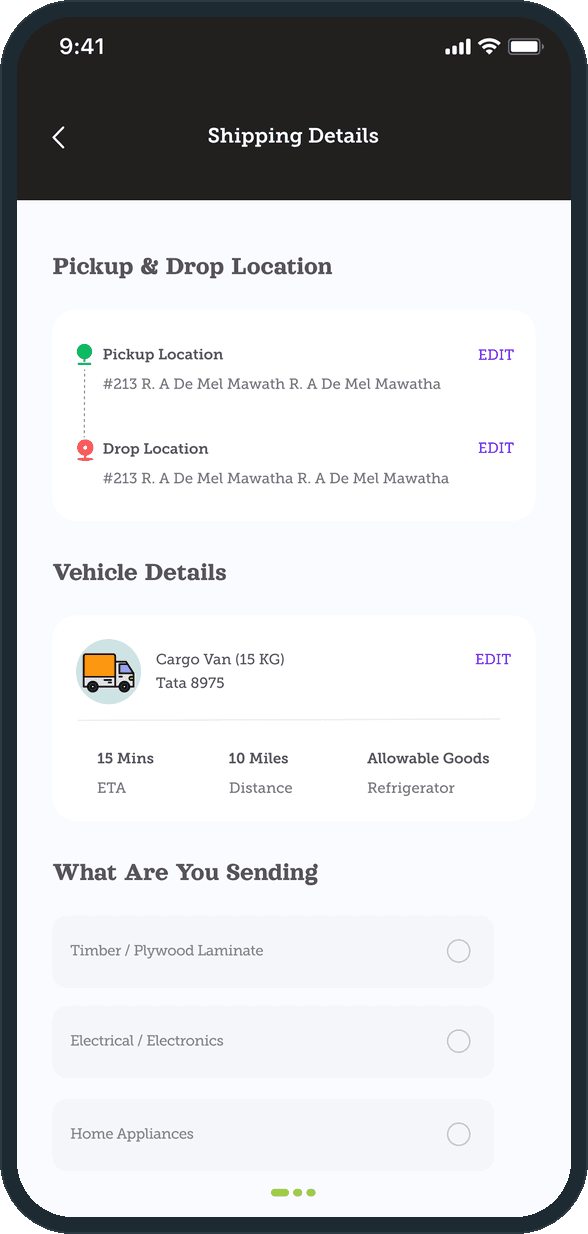
  • iNROADS: How does a shipper book a truck?
  • iNROADS: How does a shipper book a truck?

What does the driver see when a job comes in?

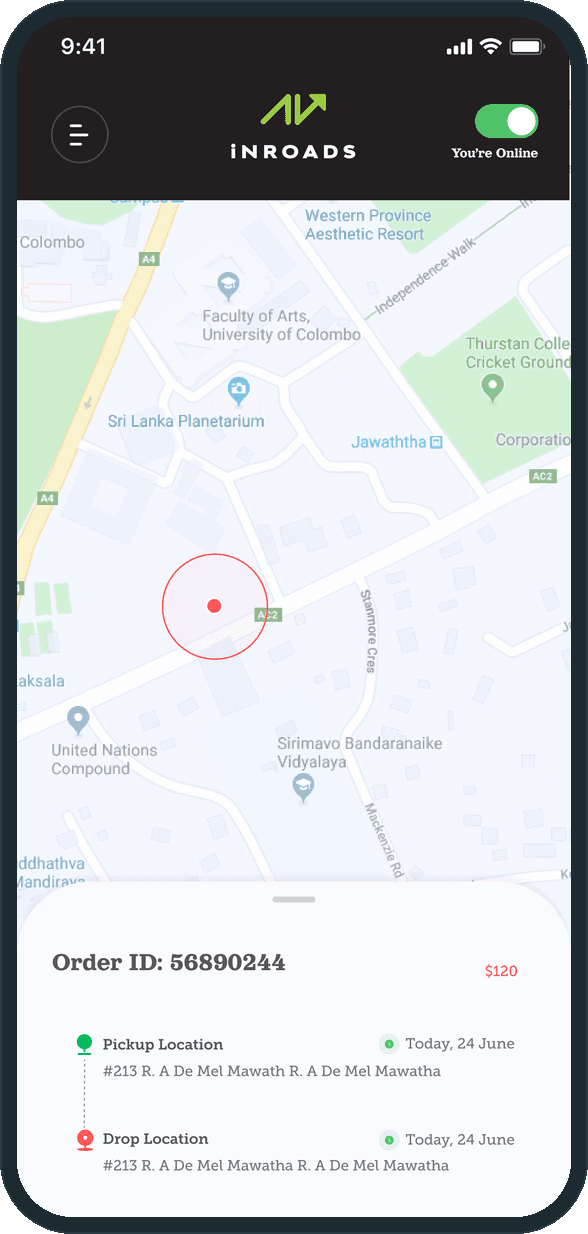
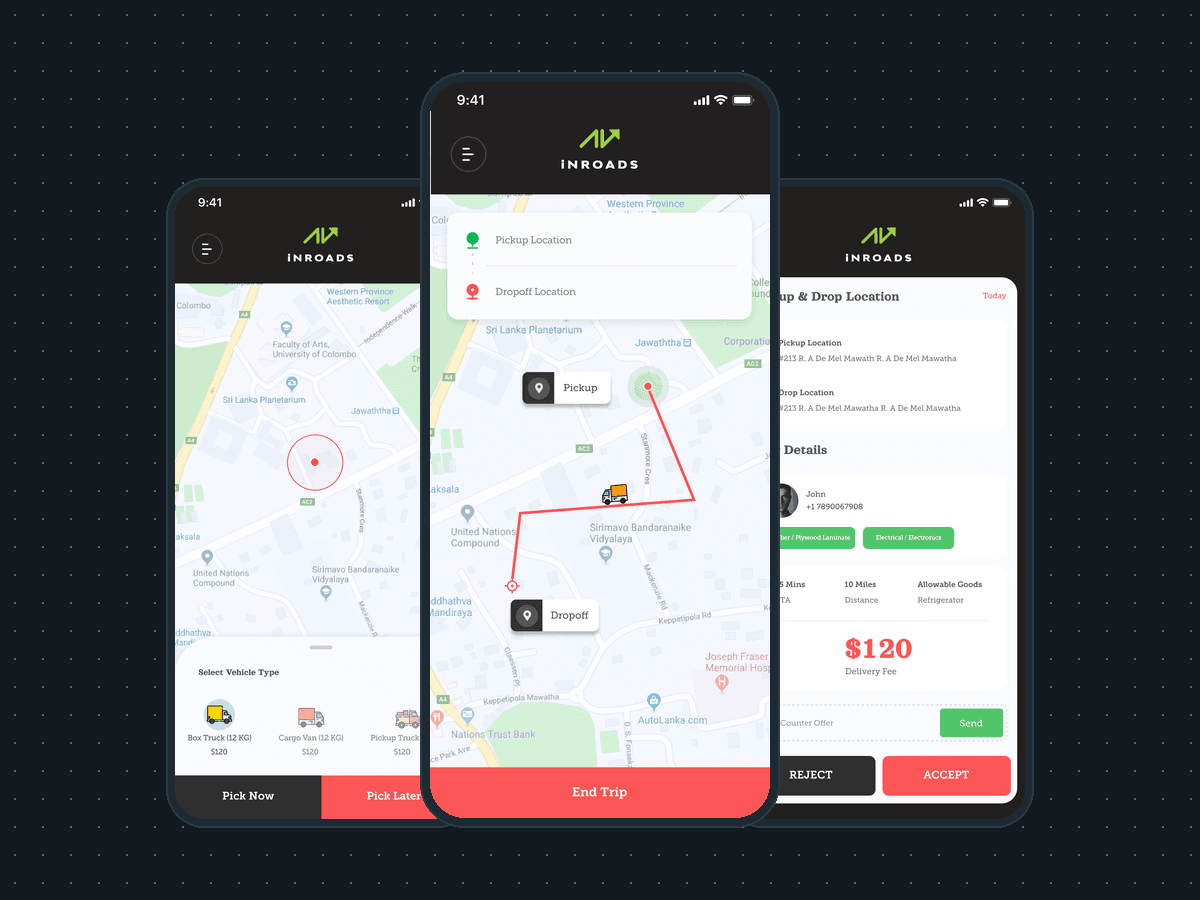
With the header toggle set to You're Online, an offer arrives with the pickup and the drop, the shipper's name and number, the goods tags, the ETA, the distance and the delivery fee. The driver can type a counter offer and send it, or press Reject or Accept. The accepted job sits in a sheet over the map with its Order ID, its price, and the pickup and drop with their dates.

  • iNROADS: What does the driver see when a job comes in?
  • iNROADS: What does the driver see when a job comes in?

How is the trip run and closed?

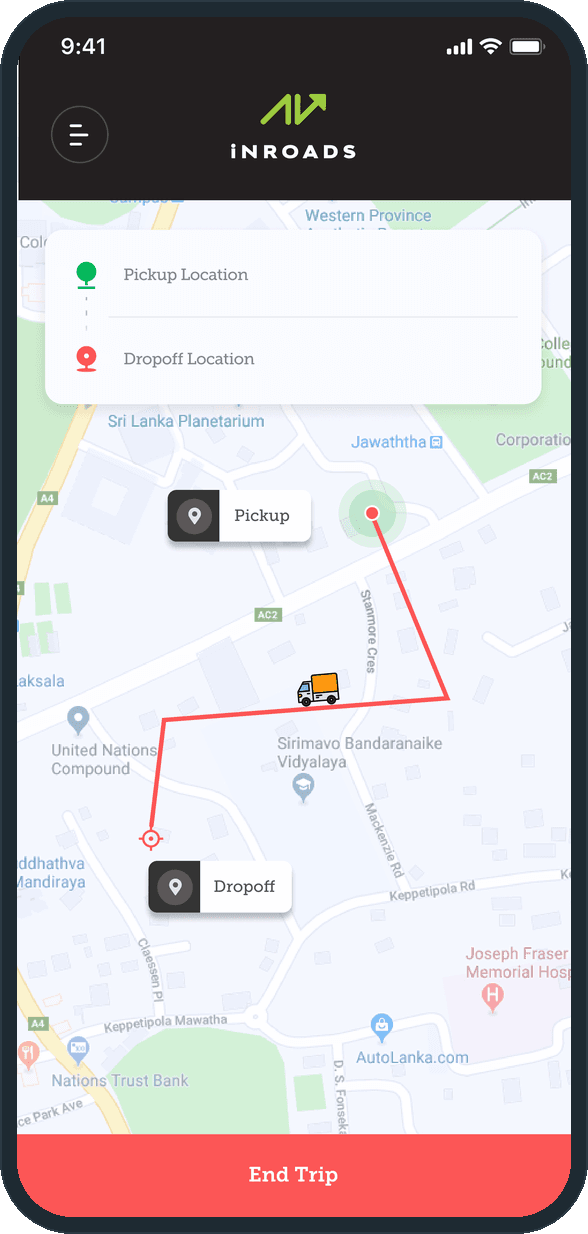
The route is drawn on the map from the Pickup label to the Dropoff label, with the truck marker on the line and both addresses in a card at the top. One End Trip bar across the foot of the screen closes the job. Nothing else sits on this screen, because the driver is driving.

  • iNROADS: How is the trip run and closed?

How do drivers see what they earned?

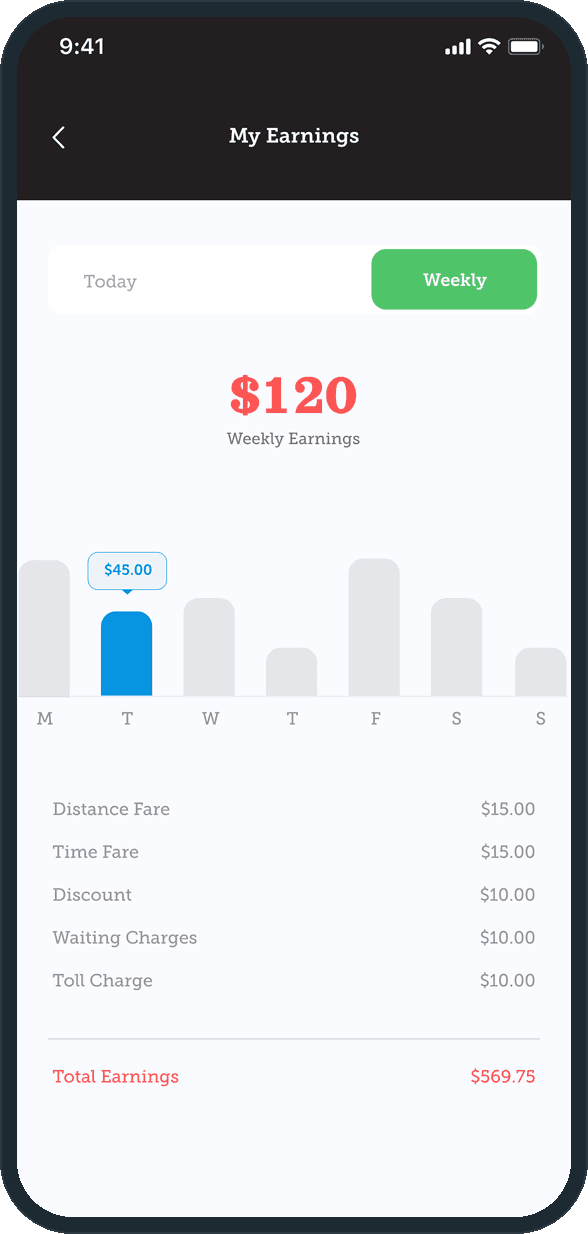
My Earnings switches between Today and Weekly. The weekly view draws a bar per weekday and shows the tapped day's amount above its bar, then lists the distance fare, the time fare, the discount, the waiting charges and the toll charge above the total.

  • iNROADS: How do drivers see what they earned?

What does the shipper review before paying?

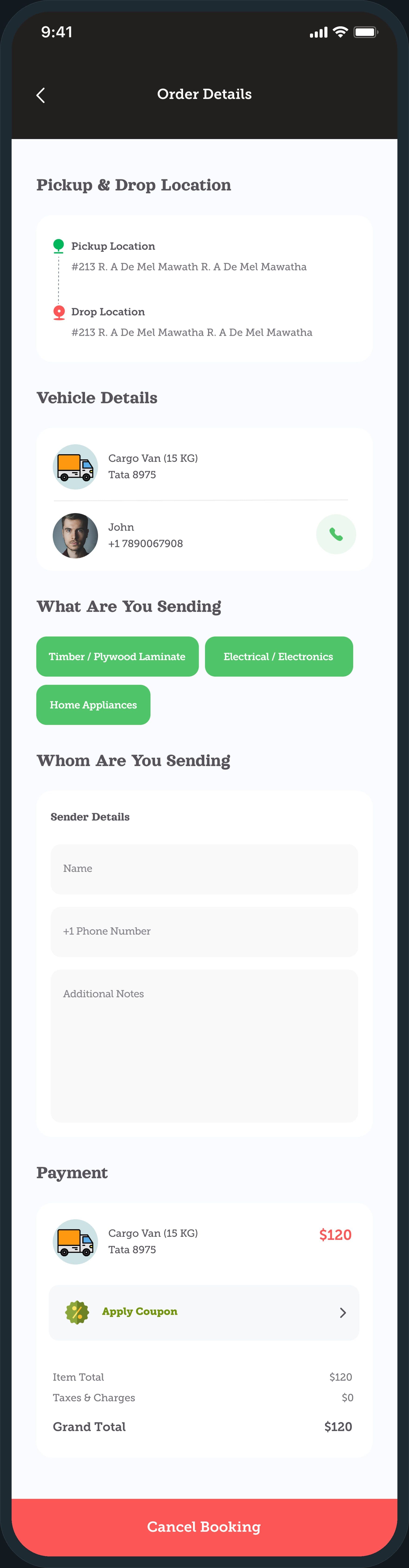
One long order screen: the pickup and the drop, the vehicle and the driver's name and number with a call button, the goods tags, the sender's name, phone and notes, then the payment block with Apply Coupon, the item total, taxes and charges and the grand total. Cancel Booking sits at the foot. Payment is the next screen: a saved card and Pay Now & Book.

iNROADS: What does the shipper review before paying?

The decisions

  • Both sides share one map.

    The shipper books on the map, and the driver goes online, takes the job and runs the trip on the same map, under the same header. What changes is the sheet at the foot of the screen: the vehicle picker on one side, the current job on the other.

  • The driver can name a price.

    A job offer carries the delivery fee in the largest type on the screen, and under it a counter offer field with its own Send button, beside Reject and Accept. The driver is not limited to taking or leaving the job.

  • One toggle puts the driver to work.

    You're Online sits in the header of the driver's home, next to the menu, and job offers follow from it. Going offline is the same switch.

  • Color carries the action.

    Coral marks the money and the decisive taps: the price, Accept, End Trip and Cancel Booking. Green marks state: the online toggle, the goods tags and the Weekly tab. The header and the splash stay near black, so the map and the sheets carry the light.

What was the outcome?

Built and delivered in under 6 months

One outcome per item, dated, or not disclosed: never an estimate.

More screens

  • iNROADS

Which of our services apply

Common questions

Did Plainbuilt build iNROADS?

Yes. Plainbuilt designed and built it full stack and delivered it in under 6 months.

Can Plainbuilt build a truck-booking or dispatch app like this?

Yes. The same shape: a shipper or customer side that books and pays, and a driver side that takes jobs, runs the trip and sees its earnings, both on one map. Book a working session to scope one.